- Dec 11, 2025
- --
Defining AI design principles for the enterprise DXP
-
 Anja von GuntenHead of Product Design, Magnolia
 -
 Jonas QueirogaSenior Product Designer, Magnolia



Experience Magnolia in action
Experience Magnolia's key features firsthand in an interactive product tour.
Take a tour nowKey takeaways
- Stability over trends: Because AI is fast-evolving, we need principles to act as a stable compass for design decisions.
- The 5 core principles: Our framework is built on being contextual, educative, user in control, transparent, and empowering.
- Context is the differentiator: Unlike generic tools, our AI utilizes enterprise data via RAG and Vector DBs to provide relevant results.
- Live implementation: These principles are already applied in the AI Accelerator 3.1.0 release, specifically in features like image generation and prompt templates.
Why we need a compass for AI
Artificial intelligence is a fast-evolving technology. In this landscape, the specific design solutions of today might be obsolete tomorrow. This presents a challenge for enterprise software: we are exploring the uncharted territory of innovative features where there are no established design patterns.
To navigate this, it is important to define design principles rather than just chasing features. Principles act as a compass to guide big and small design decisions. They allow us to achieve a consistent way of interacting with generative AI across multiple features, ensuring stability even as the underlying technology shifts.
Our principles are not guesses. They were developed through a rigorous process of monitoring the market (analyzing features on Gartner.Plus), benchmarking against competitors, and deep immersion in the AI world, including a 60-hour MIT xPro course on designing AI products.
The 5 principles of the Magnolia AI experience
From our vision as a data-driven AI DXP (Digital Experience Platform), we derived five specific principles. These ensure that we take meaningful and consistent decisions during the design process to deliver a high-quality user experience..
1. Contextual

When comparing using AI inside Magnolia versus using another AI product like ChatGPT or Gemini, the differential is the customer context.
The goal: We need to find ways to show when and how this context (such as blogs, pages, and knowledge bases) is being used.
Technical reality: This relies on Vector DB, RAG (Retrieval-Augmented Generation), and MCP server connections.
Design execution: We use visual cues, such as a tag on top of the AI input, to signal that context is active.
2. Educative

Interacting with AI is different then other types of software interactions.
The goal: We need to differentiate AI features from other features and provide guides on how to use the most out of it.
Design execution: We use a gradient for AI actions to make them distinct. We also provide prompt suggestions and prompt templates within the vision features to teach users how to prompt effectively.
3. User in control

Automation should not remove human agency.
The goal: It is up to the user to review what AI generated and make the final decision.
Design execution: For example, when generating pictures, the system creates 4 options and allows the user to decide which to save. Similarly, the user makes the final decision on content generated in AI-assisted text fields.
4. Transparency
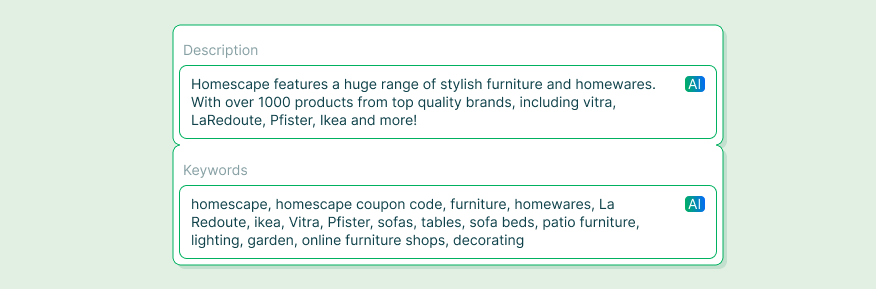
Trust is critical for the user experience of the content editor
The goal: It needs to be clear to the editor what is generated by AI and why it was generated.
Design execution: We place an AI label on interface fields generated by AI so the editor knows the content's source. We also provide the option to see the reasoning behind AI optimization suggestions.
5. Empowerment
AI features should not just be novel; they should drive value.
The goal: Features should aim to increase the impact of users' work inside Magnolia.
Design execution: This includes high-volume tasks like generating Alt text for thousands of assets, instant translation, and hyper-personalization.
Implementing the vision
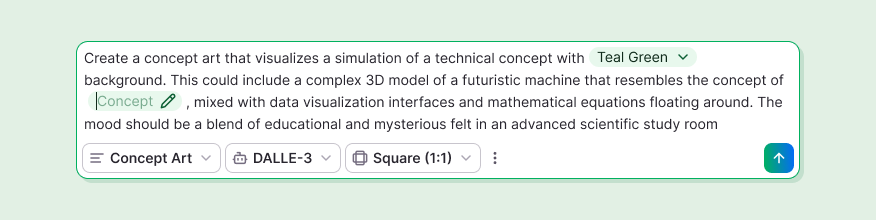
These design principles are already starting to be implemented in the product.
For instance, the new design for Image Generation and Prompt Templates in the AI Accelerator 3.1.0 clearly demonstrates the "Educative" and "User in control" principles. By offering prompt templates, we educate the user; by allowing the user to select the best image and modify it with a prompt, we ensure they remain in control.
This release marks the first iteration toward achieving our comprehensive AI design vision, with much more to come in future developments.